

Remote Start and Stop of PLC-Controlled Equipment
When distributed equipment needs a planned start or stop, maintenance engineers usually call to check its status before deciding whether to visit. Equipment identity, current mode, and operating conditions are verified verbally. The site may be ready while remote personnel still lack information they can inspect directly.
Consider a typical maintenance scenario: PLC-controlled equipment supports routine remote start and stop, with someone on site confirming conditions according to procedure. An industrial smart gateway connects the exposed status and control points to an integrated cloud platform. The engineer checks status first and assists with operation only when equipment support, access authorization, on-site confirmation, and local safety interlocks are all in place.
Map Equipment Status and Control Points
Start with the equipment. Check the PLC model, protocol, readable states, and writable control points. Confirm that the PLC program includes a remote operating mode and the corresponding command-handling logic. Connect the gateway, then test status reads and authorized control-point writes on site. Network connectivity alone cannot provide remote start and stop without equipment control logic.
The gateway supports PLC data acquisition and control: it reads status through a compatible protocol and writes commands to confirmed control points as configured. Configure bidirectional communication with the cloud platform so that platform device identities, commands, and PLC variables correspond individually. Adapt communication interfaces, command formats, and status feedback to the actual platform and equipment; publishing data does not mean the control path is complete.
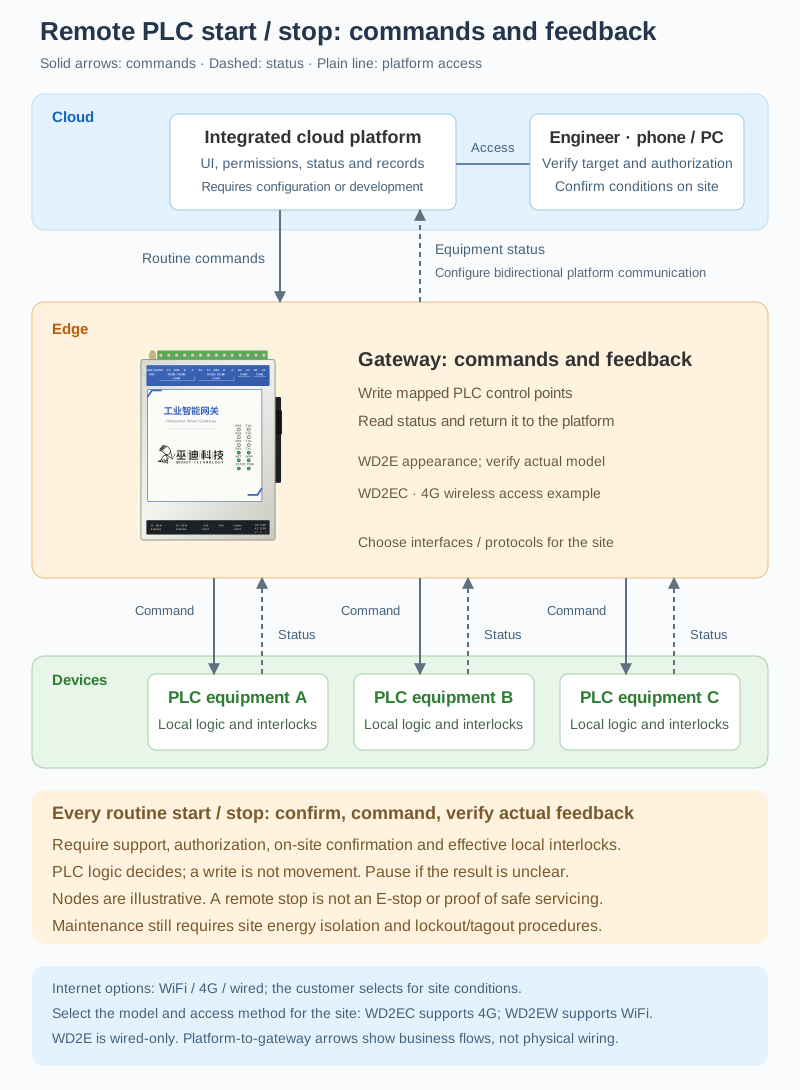
The three PLC nodes illustrate separate logical relationships, not an equipment count or a shared physical bus. WD2E illustrates the device appearance. Arrows connect to the gateway's functional area, not enclosure terminals; select the actual model, interfaces, and protocol for the site design.
Responsibilities remain separate. The platform's operator pages, user permissions, status display, and operation records need configuration or development and integration. The gateway passes commands and collects feedback. The PLC program decides whether to execute based on operating mode and local safety interlocks, and the equipment supplies post-action status. Connecting a gateway does not automatically create a remote control platform.
Confirm Before a Planned Start
On-site personnel first complete the prescribed pre-start checks. They confirm that the equipment is not under maintenance or lockout/tagout, people are outside hazardous areas, and remote operation is permitted. The engineer signs in to the platform, verifies the target equipment identity, communication status, and data timestamp, then confirms the current working conditions and operation authorization with the site.
Only when the equipment supports the operation, authorization and on-site confirmation are in place, and local safety interlocks remain effective does the engineer issue the start command. The gateway writes the mapped control point, and the PLC program decides whether to accept and execute it. Check the running feedback provided by the equipment and have on-site personnel confirm actual movement. Successful command transmission or variable writing does not mean the equipment has started.
A routine stop follows the same authorization, on-site confirmation, and interlock requirements, with actual feedback checked afterwards. If data is stale, communication fails, or the outcome is unclear, pause remote operation and verify with the site rather than repeatedly sending commands blindly. For traceability, configure platform records of personnel, equipment, commands, and feedback. Their completeness depends on platform implementation and the data exposed by the equipment.
Deployment and On-Site Safety
- Verify supported read/write protocols, variable definitions, remote mode, command handling, and feedback logic on site first.
- Check gateway interfaces, upstream networking, and bidirectional platform configuration; configure user permissions and display data timestamps.
- Define responsibilities between remote and on-site personnel, exception handling, and procedures for ending the operation.
Remote start and stop is for permitted routine operations, not an emergency stop or safety control system. It cannot replace on-site emergency stops, local controls, or safety interlocks. Before maintenance, isolate energy and apply lockout/tagout according to site procedure. A platform status of “stopped” does not prove that equipment is safe to service.
Previously, engineers often had to stand beside the equipment to read its interface and assist with operation. With this connection, they can inspect status on the platform and perform approved routine operations with on-site cooperation. For rental providers and distributed maintenance teams, the benefit is fewer visits solely to inspect status or relay commands, not the removal of equipment adaptation or safety checks.