Centralized CNC Program Uploads and Downloads to Designated Machines
When a machining job changes, a process engineer locates the program, copies it to a USB drive and imports it at the designated machine. If a file with the same name remains on both the computer and the machine, the operator also has to check which version to use. The issue is not that programs cannot be transferred; it is that transferring, checking and retaining them all depend on repeated trips across the shop floor.
Imagine a CNC workshop where jobs change frequently: connecting the machines to a program storage location allows programs to be uploaded from, or sent to, designated machines. Engineers can then spend more time checking that each program matches its machine.
Programs move between machines and storage
The industrial smart gateway's DNC (Direct Numerical Control) function supports reading machining programs from a machine into the gateway or storage, and sending programs from the gateway or storage to a designated machine. Files can reside on an FTP server, a NAS accessed through a supported protocol such as NFS/SMB, or supported cloud storage.
First verify the CNC control model, program transfer interface and read/write support. Then configure the target machine connection, storage protocol, account and directory in the gateway. The engineer checks the file list and read/write permissions and verifies transfers while the machine is in a permitted state, confirming that filenames, formats and destination directories meet its requirements. The diagram retains example relationships between multiple gateways and machines. Actual ports, network paths and deployment quantities depend on the site design; the logical diagram is not a port-wiring plan.
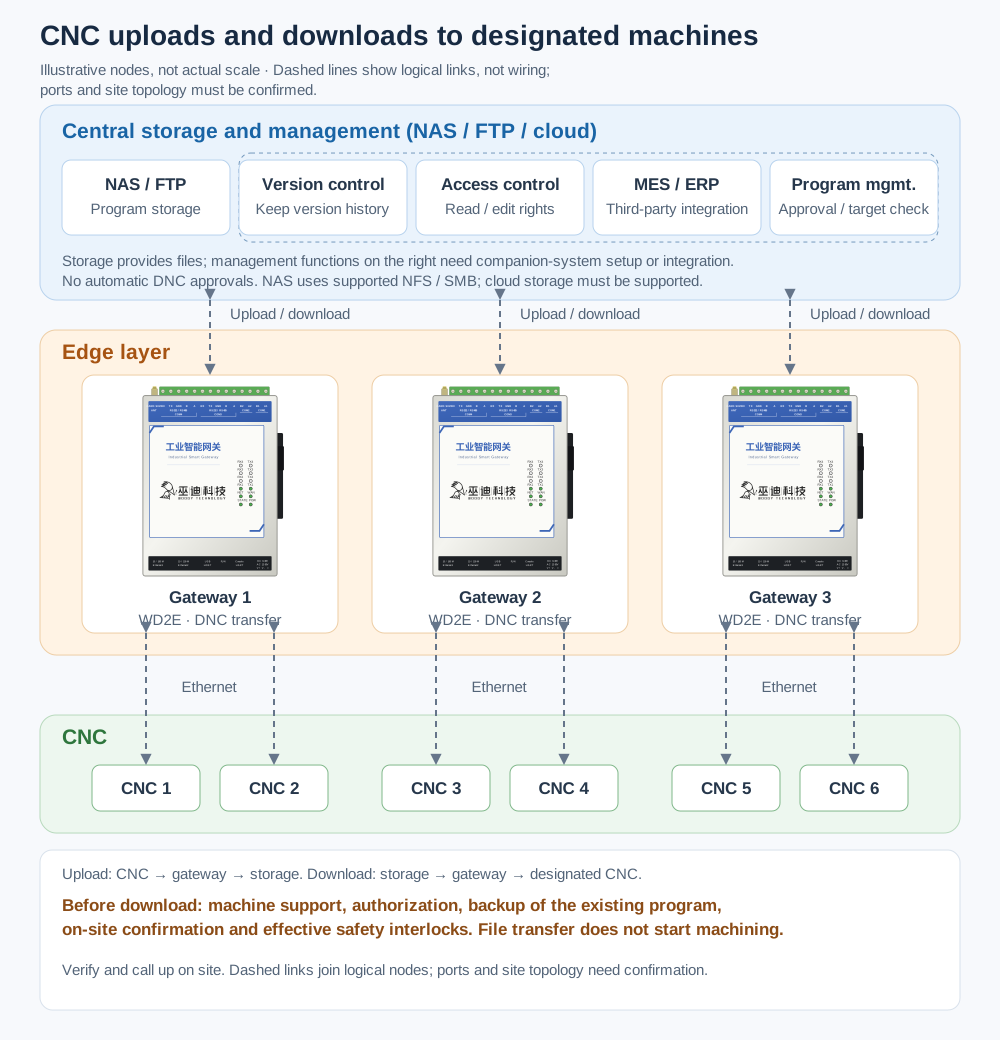
The diagram shows the logical relationship between program uploads and downloads. It does not indicate how many machines or gateways a real workshop has, and it is not a port-wiring diagram. The gateway transfers programs; program repositories, approvals and user permissions require configuration or integration of the accompanying storage or management system.
Send programs to designated machines instead of copying them one by one
For example, a process engineer places a checked machining program in the agreed directory and confirms the workpiece, program version and target machine. Downloading requires machine support for program reception and authorized access. Before overwriting a file, back up the existing program, have on-site staff confirm machine status and reception conditions, and keep safety interlocks effective. Only then perform the DNC download to the designated machine.
The operator checks the received file at the machine and calls it up using established procedures. Transferring a file does not start machining or replace pre-machining process checks. If on-site changes must be retained, upload the program to the agreed storage location within the machine's supported capabilities and the authorized scope, then have the responsible person check the file and record. This avoids repeatedly moving files on a USB drive and makes the source and destination of each transfer clearer.
Separate file transfer from program management
The gateway uploads and downloads programs and transfers files to designated machines. File naming, version records, approvals and user permissions belong to workshop procedures and the accompanying storage or management system. MES/ERP workflows require configuration or development and integration by the third-party system. DNC file transfer does not create an automatic version approval workflow or determine whether a program suits the current workpiece, tools and machine.
What to confirm before connecting
- Check whether the CNC system and interface support the required uploads and downloads, and whether program formats, directories and filenames meet machine requirements.
- Verify connectivity between machine, gateway and storage, supported storage protocols, and accounts with necessary and appropriately scoped read/write permissions.
- Assign responsibility for naming, version checks, historical retention and approvals, including how on-site changes are uploaded and confirmed.
- Before downloading, complete access authorization, backup of the existing program, on-site status confirmation and safety interlock checks. After receipt, verify and call up the program according to machine and workshop procedures.
Link program delivery with on-site verification
For workshops that update programs often, DNC first addresses how to circulate programs centrally and deliver them to designated machines. Whether a machine receives and runs a program as intended still depends on on-site connection checks and operating procedures.