

Centralized Equipment Data Monitoring Across Multiple Factories
Imagine a manufacturer with production facilities in different locations. Before a production coordination meeting, the person in charge needs to ask each factory for equipment status and production progress. Some send photos of equipment screens, others submit manual spreadsheets, and some are still waiting for confirmation from the shop floor. By the time all the information arrives, the status shown in a screenshot may already have changed.
The issue is not just the distance between factories, but the lack of a shared place to access information. Industrial intelligent gateways at each factory can collect equipment data and connect to a unified platform. Managers can then view the status and counts of connected equipment in one place before contacting the relevant site about specific issues. The gateways make the data available; the platform organizes information from different factories into usable pages.
Start With the Data Each Factory Needs
There is no need to send every equipment parameter to headquarters from the outset. For day-to-day coordination, start with equipment IDs, operating status, existing alarm information, and counts that may be suitable for production statistics.
Woody industrial intelligent gateways support data acquisition from a range of mainstream PLC/CNC systems. At each factory, engineers check the specific equipment models, interfaces, protocols, and read permissions. In the gateway's Web management interface, they configure the appropriate drivers, communication parameters, and data points, then compare the readings with the equipment screen or the logic used on site.
For example, a count provided by a machining center may represent machining cycles rather than the number of good parts. Whether that count can be used for production reporting must be checked against the equipment signals and the site's reporting definitions. A collected number cannot simply be relabeled as "production output."
Select gateway models according to the site's interfaces and network conditions. Deployment across multiple factories does not require every site to use the same hardware model. Get the key data right first, then gradually expand coverage.
The Same Field Must Mean the Same Thing
When viewing data across factories, the most common difficulty is not a missing chart, but fields with the same name that mean different things. At one factory, "running" may mean automatic machining; at another, it may only mean the equipment is powered on. Putting both in the same column can lead to misinterpretation.
Before integration, agree on factory IDs, equipment IDs, status definitions, counting conventions, units, and acquisition times. Equipment IDs must be unique within the agreed scope. Do not force unmatched statuses into a category; display them explicitly as "unknown" or "pending confirmation."
For shift or daily summaries, also define time zones, shift boundaries, and how counter resets are handled. Counts from different processes or products cannot simply be added together and treated as the group's total production output. These business rules require configuration or development in the supporting platform.
Gateways Publish Data; the Platform Organizes It for Viewing
Once on-site data acquisition is in place, each factory's gateway can publish data using MQTT or HTTP/HTTPS, among other methods, according to the receiving platform's requirements. Engineers need to configure the platform address, authentication information, topics or API paths, and field mappings. The specific protocol depends on the interfaces supported by both sides.
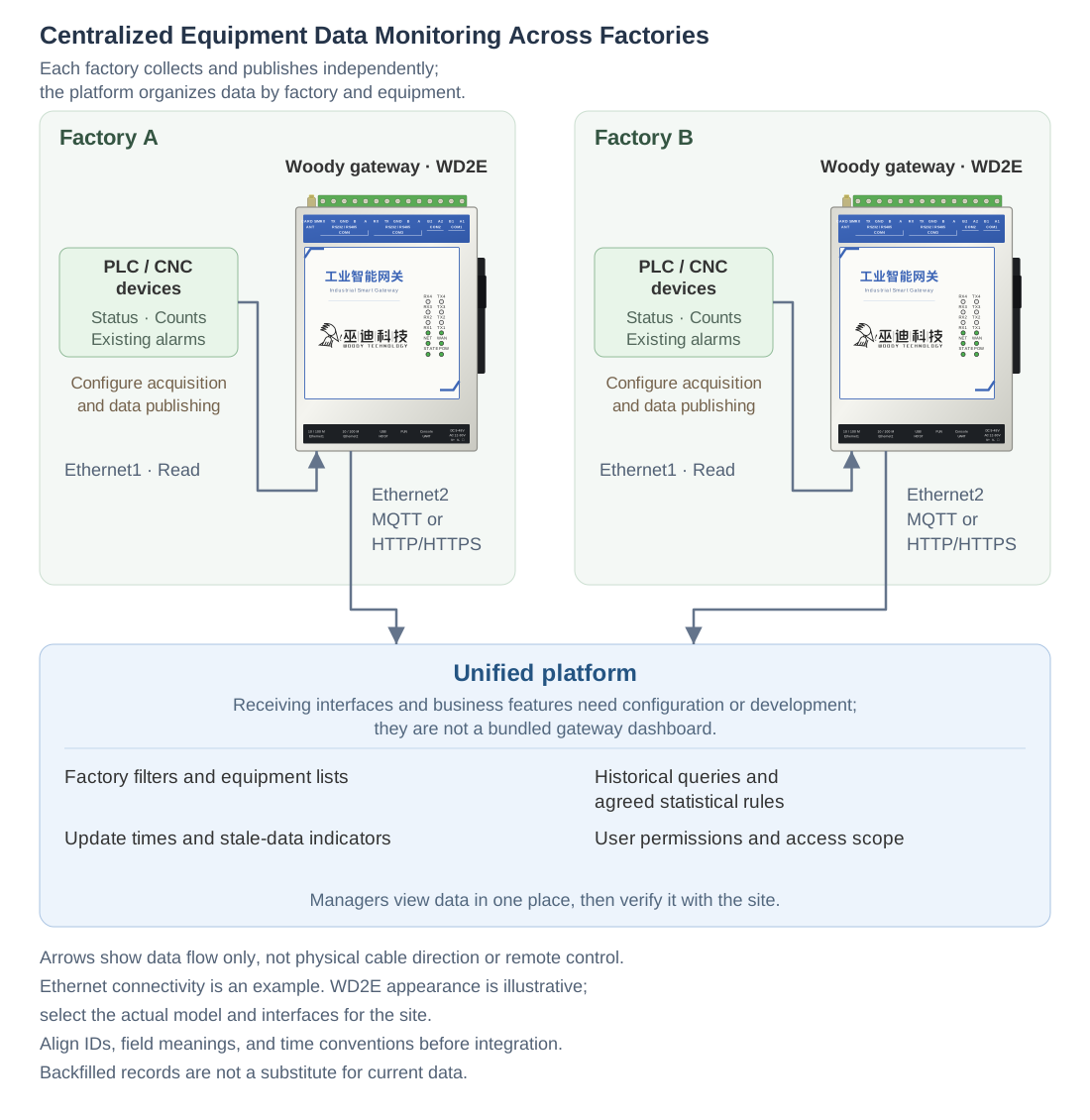
The responsibilities along this path must remain clear:
- Equipment provides the raw signals: It exposes readable data such as status, counts, and alarms.
- Each factory's gateway collects and publishes data: It reads the configured data points and transmits them in the agreed format.
- The unified platform provides the business-facing pages: It implements factory filtering, equipment lists, historical queries, and the required statistical rules and permission settings.
The platform may be an existing system or a separately built application. Gateway support for data publishing does not mean a multi-factory management dashboard is included. The platform's receiving interface and display functions still need to be implemented.
Check the Update Time Before the Equipment Status
Back at the production coordination meeting, once integration and page configuration are complete, the person in charge can view equipment lists by factory, identify which machines are running and which have existing alarms, then ask the relevant site to verify the situation. There is no need to gather screenshots from every factory just to check a status.
However, a page showing "running" does not necessarily mean the data is current. The platform should also display the update time and flag stale data or communication issues using agreed thresholds, so the last received status is not mistaken for the current on-site status. These indicators require platform configuration or development.
The gateways support offline caching and resumable transmission, which can be used to send buffered data after the network recovers. In practice, configuration, available storage, and the behavior of the publishing path must be checked. This is not a guarantee against data loss under every interruption scenario. If historical records are required, agree on acquisition timestamps and platform processing during integration, distinguishing backfilled records from current data. Sending buffered records later does not eliminate the gap in visibility during a network outage.
A stopped machine cannot be classified as faulty or short of material based on a single status alone. Centralized monitoring provides clues for contacting the site. The reason for a stoppage still needs to be confirmed using alarms, on-site feedback, or separately configured reason records.
What to Confirm Before Integration
- Check equipment models, protocols, interfaces, read permissions, and accessible data at every factory. Support for a brand does not mean support for all of its models.
- Align factory and equipment IDs, status definitions, count meanings, units, timestamps, and aggregation rules, and define how abnormal data will be handled.
- Confirm each factory's network access conditions, the platform's receiving interface, and authentication methods. Use supported encrypted connections as required by the receiving endpoint, and configure credentials and access permissions.
- Agree on acquisition frequency and communication load with on-site maintenance staff. Implement platform pages, permissions, historical records, and stale-data indicators, and plan cache capacity and historical data retention according to the storage resources actually available.
This solution only reads and publishes equipment data. It does not involve remote start/stop, parameter writes, or program downloads, nor does it require multi-gateway Grid networking as a prerequisite for centralized monitoring across factories.
Start With What a Coordination Meeting Actually Needs
The best information to connect first is what each factory is repeatedly asked for every day and can actually be read from the equipment. Select a set of key data, standardize its meaning and time conventions, then have the people who will use the platform evaluate its pages.
Centralized monitoring then becomes more than putting numbers from different factories on one screen. It gives the person in charge traceable information whose freshness can be assessed, so they can contact the site with a clear question. On-site communication remains important, but it no longer needs to begin with another round of screenshot collection.