Remote Monitoring of Rented Equipment Status and Operating Hours
After equipment reaches a customer's site, the rental provider often has to contact on-site staff or wait for an inspection to find out whether it is running and how long it has operated. Scattered information makes it harder to reconcile usage records or arrange maintenance without repeated calls.
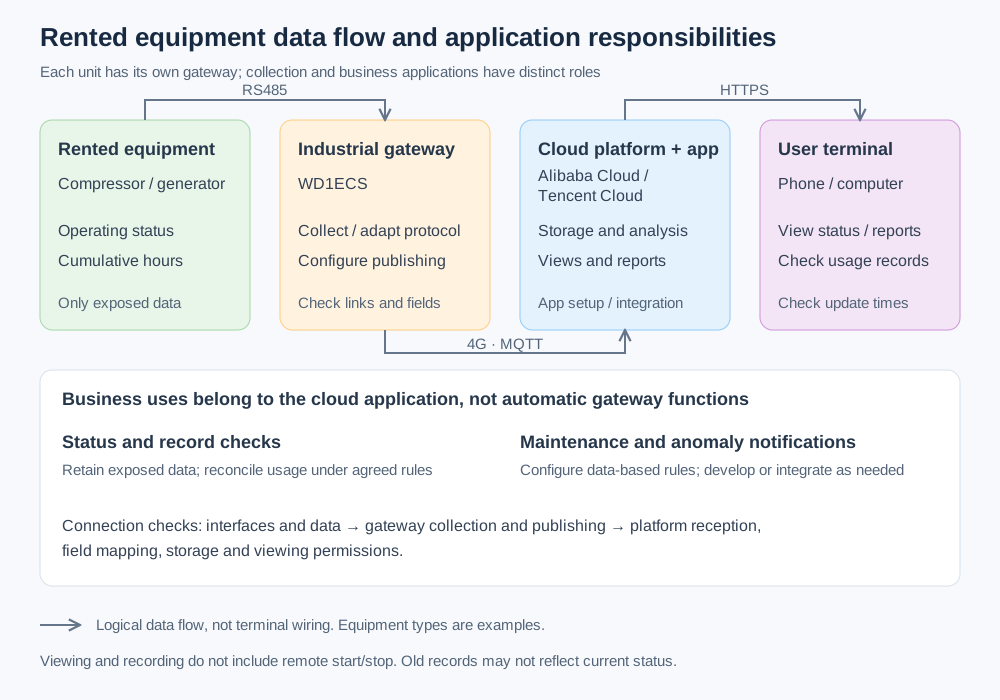
Consider a typical equipment rental scenario: if the equipment controller exposes operating status and cumulative operating hours, the provider can connect an industrial smart gateway on site and integrate the collected data with a cloud platform. Managers can then check the equipment through the associated cloud application without visiting it every time.
Collect controller data and connect it to the cloud application
Consider a WD1ECS connected to a controller over RS485. This model has one RS232/RS485 serial port, one Ethernet port and 4G connectivity. First identify the controller model, communication protocol and exposed data points. Connect the serial cable, then configure the device driver, communication settings and collection variables in the gateway's Web management interface. Wiring is only the first step: the engineer also compares the collected status and cumulative operating hours with the on-site display to verify their meaning, units and updates.
Next, configure the 4G connection and MQTT or HTTP/HTTPS publishing, including the cloud endpoint, credentials and reception requirements. Map equipment identifiers and collected fields to the platform's data model. Managers can view the information on a phone or computer once the platform's reception and application configuration are complete. The equipment types in the diagram are examples of potential uses, not a claim that every compressor, generator or construction machine exposes the same data.

The gateway collects and transmits field data. Storage, monitoring screens and business analysis are provided by the integrated cloud platform and application; connecting a gateway alone does not provide those functions automatically.
Replace repeated calls with status and record checks
Once the application is integrated, managers can check operating status on a phone or computer instead of asking on-site staff. If the equipment provides usage-hour data, the cloud application can also retain records for both parties to review. How those records are used for rental billing depends on the actual business rules.
Scheduling maintenance by operating hours or notifying maintenance staff when equipment reports an anomaly requires corresponding rules in the cloud application, and may require development or integration. The gateway supplies readable equipment data; it does not replace the application's alerts, reports or response workflow.
What to confirm before connecting
- Check the available interfaces, protocols and data points. Distinguish a controller-provided hour counter from operating hours that would need separately defined calculation logic.
- Verify power, serial wiring, 4G coverage and cloud connectivity. Check data timestamps when viewing records rather than treating old values as current status.
- Confirm platform reception, equipment identifier mapping, storage and viewing permissions. Maintenance reminders, anomaly notifications and reports require configuration or development and integration.
- Agree on retention periods, how both parties reconcile records and the applicable rental rules. This solution focuses on viewing and recording, not remote start or stop.
Give maintenance teams a shared record
For rental providers and maintenance teams that need ongoing visibility, this approach brings readable field data into a shared application. Instead of calling or visiting each time to copy values, managers can check status and records first, then decide what needs on-site confirmation and how to follow up. The gateway makes the data available; the cloud application turns it into usable working information.