

Data Acquisition and Centralized Monitoring for Multi-Brand PLC Equipment
Consider a workshop with assembly, inspection, and packaging equipment. At shift handover, the production supervisor checks each screen, asks operators, and pieces together the status and counts for every station. Records taken at different times often mean another trip is needed to confirm current progress.
The machines were bought at different times and have different controllers: Siemens PLC on assembly, Mitsubishi PLC on inspection, and Omron PLC on packaging. Each works on its own, yet there is no common place to view their data.
An industrial smart gateway can collect available equipment data and connect it to a supporting platform, creating a shared viewing interface without standardizing every machine on one PLC brand.
Get the data you need without replacing the entire line
The supervisor does not necessarily need hundreds of parameters. The questions are simpler: which machine is running, which has stopped, what is the count at each station, and is there an alarm?
This is where an industrial smart gateway's data acquisition function comes in.
Woody industrial smart gateways support data acquisition from several mainstream PLC brands. Engineers first check each PLC's exact model, communication interface, protocol, and access conditions, then configure the points to read. From equipment that meets those conditions, the gateway can collect available run signals, counts, and alarm codes. There is no need to standardize every machine on one PLC brand just to see the data together.
For the actual setup, engineers create a record for each device in the gateway's Web management interface, select a compatible driver, and enter communication parameters, point addresses, and data types. They check IP and communication settings for Ethernet connections and the electrical interface and communication parameters for serial connections. Readings are compared point by point with the machine display to confirm what run, stop, and alarm signals actually mean.
For example, a packaging-machine screen may show a "shift total" while its PLC only provides a cumulative count. The supporting platform must calculate shift output using shift rules and handle counter resets. Reading a value through the gateway does not mean every business metric is ready to use.
Bring the data together, then align its meaning
One easily missed detail is that the "same number" on different machines may mean different things.
An assembly count may represent completed actions, an inspection count the number of inspections, and a packaging count the number of packed items. Adding the three does not yield workshop output.
Engineers and production staff therefore agree on equipment IDs, point definitions, units, and counting rules. They identify which signal means automatic operation, which indicates an alarm, and which count is suitable for shift handover, against each machine's actual logic.
Next they configure the gateway-to-platform integration. The gateway supports protocols such as MQTT and HTTP and can transmit data according to the receiving platform's interface requirements; equipment IDs, field mappings, and authentication details must be configured for the integration.
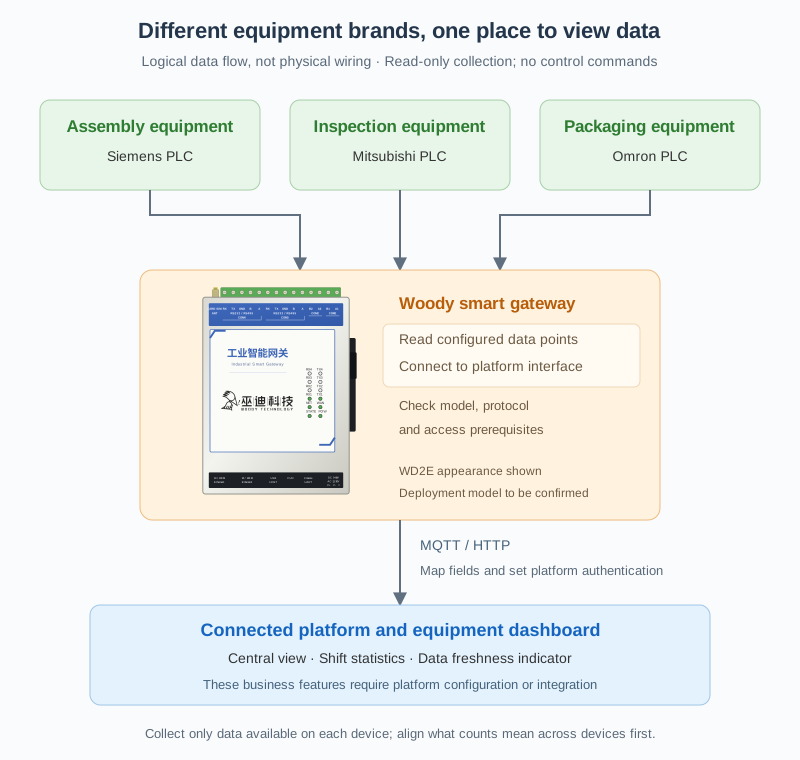
Each part has a different role:
- The PLC provides source data: available run signals, counts, alarm codes, and similar values.
- The gateway collects and transmits: it reads configured points and passes them to the platform through the agreed interface.
- The supporting platform displays and processes business data: equipment dashboards, shift statistics, and historical views require corresponding platform functions or development and integration.
Connecting a gateway is not the same as already having a production management system. The gateway gets equipment data out and sends it onward; the supporting platform provides the interface the supervisor sees.
At shift change, check one screen before checking the floor
Back in the workshop, once acquisition and dashboard integration are configured, shift handover can follow a different sequence.
The supervisor opens the platform's equipment list to see the status and counts for assembly, inspection, and packaging. The dashboard also shows when data was last updated and flags broken communications or stale data, so old readings are not mistaken for current status. These display rules are configured on the platform.
If the inspection machine shows as stopped, the supervisor can contact that station first to confirm whether a changeover or an anomaly is involved.
People still need to make that judgment. A PLC stop signal only says the machine was not running at that moment; it cannot by itself distinguish material shortage, a fault, or an absent operator. Determining the cause requires equipment alarms, feedback from the floor, or a separately configured reason-recording function.
The change is in the order of work: instead of walking the whole floor to piece together the situation, the supervisor checks a consolidated view and then goes to the floor with specific questions. At handover, the team can compare the same set of equipment data rather than notes taken at different times.
On-site inspection is not eliminated, but there may be fewer trips made solely to check a number or confirm a status.
Confirm before connecting
- Check each PLC's exact model, protocol, interface, read permissions, and available data. Support for a brand does not imply support for every model. WD2E in the diagram is an appearance reference; select the deployed model for the interfaces and network conditions.
- Agree on counting definitions, units, shift rules, and counter-reset handling for each station. Do not confuse action counts, inspection counts, and packed units with production output.
- Confirm acquisition frequency and communication load with maintenance staff. Check the platform's receiving interface, authentication, and field mappings, and arrange configuration or development of dashboards, historical records, and stale-data indications.
Start with the data used every day
For a workshop with equipment from different suppliers and mixed PLC brands, complex analysis need not be the starting point. Choose a production line first and retrieve run status, key counts, and existing alarm information for the people who actually use that data daily.
This scenario reads equipment data only; it does not involve remote starting, stopping, or parameter writes.
Different machines can continue doing their respective jobs. With data collected through an industrial smart gateway and integrated into a suitable platform, supervisors can move from "walking to every machine to find information" to "seeing the situation first, then addressing the problem."